Home › Decorators
Decorators
Bollhav ships three decorators. One wraps your main() entry-point; two bracket the work inside it — one per model, one per unit of work. The right-side TOC indexes each individually.
| Decorator | Wraps | What it brackets |
|---|---|---|
@load_models |
main(models, debug) |
env vars + model discovery + tag matching + runtime overrides |
@model_lifecycle |
one model's run | asset DDL + state bootstrap, then your interval loop |
@execute_lifecycle |
one unit of work | the state machine + staging around a single execute |
@load_models
Wraps your main(models, debug) entry-point. Reads every bollhav env var (Env), discovers Model instances under the configured folder, runs tag matching, applies runtime overrides, and hands the resolved model list to your function. Details: @load_models.
@model_lifecycle
Brackets one model's run: sets up assets and state, calls your function (which loops run.intervals), then tears down. Details: Model lifecycle.
@execute_lifecycle
Brackets one unit of work: read, transform, write, with the state machine and staging handled around it. Details: Execute lifecycle.
State is not a decorator. It is opt-in per model via state=State(...) on the Model and handled inside the lifecycle hooks — @model_lifecycle seeds the state rows, @execute_lifecycle runs the per-unit state machine. See State.
@load_models
@load_models is the standard entry point — it wraps your main(runs, debug) function and does everything needed to hand you a ready-to-run list of ModelRuns.
from bollhav.model import ModelRun, load_models

@load_models
def main(runs: list[ModelRun], debug: bool) -> None:
    for run in runs:
        for interval in run.intervals:
            execute(run, interval, ...)


if __name__ == "__main__":
    main()
Step by step
When you call main(), the decorator runs the following steps before your function body executes:
- Read env vars. Pulls every runtime override from the environment —
TAGS,SCHEMA_SUFFIX,LATEST_ENABLED,BACKFILL_ENABLED,RUN_SINCE,RUN_UNTIL,INTERVAL_OVERRIDE,WINDOW_OVERRIDE,LOOKBACK_OVERRIDE,TIMEZONE_OVERRIDE,DRY_RUN,DEBUG. Full list: Runtime overrides. - Validate the combination. Rejects illegal mixes — e.g.
LATEST_ENABLEDandBACKFILL_ENABLEDbothtrue, aWINDOW_OVERRIDEwithoutLATEST_ENABLED, a negativeLOOKBACK_OVERRIDE, an unknownTIMEZONE_OVERRIDE. - Print the runtime summary. A short banner showing the resolved mode, tags, suffix, and any overrides in effect — so the first lines of stdout tell you exactly what this run will do.
- Discover models. Imports every
Modelinstance found underfolder(defaults tosrc/models; pass@load_models(folder="...")to change). - Match by tags. Filters the discovered models against the
TAGSexpression and topologically sorts them by their upstream dependencies. See Matching and Tags. - Bake in the overrides. Each matched model is copied (the source models are not mutated) with:
target.schema_suffixset toSCHEMA_SUFFIXtarget.suffixset toTABLE_SUFFIX(whenUSE_TABLE_SUFFIX=true) — see Schema vs table suffixbatching.time(itschunk/window/lookback/tz) updated byINTERVAL_OVERRIDE/WINDOW_OVERRIDE/LOOKBACK_OVERRIDE/TIMEZONE_OVERRIDE
The chosen mode does not land on the model — it resolves the run's [since, until) window (from the mode + Contract), which is carried on the returned ModelRun as run.window, with run.is_reload / run.is_latest / run.is_backfill recording which mode resolved it.
7. If DRY_RUN (or DRY_RUN_EXTRA): print the matched-model summary and return without calling your main().
8. Otherwise: call your function as main(runs=<resolved list>, debug=<DEBUG>).
Calculating intervals
@load_models resolves each model's [since, until) window from the run mode + Contract, then compute_intervals(run) splits it by batching.time.chunk into TZInterval chunks (held on run.intervals). See Chunking and Write modes.
Mental model
Env vars in → matched-and-overridden
ModelRunlist out → your code runs.
You write models declaratively and a plain main() that loops over them. @load_models is the glue that turns the env into a concrete plan and gives it to you.
Model lifecycle
@model_lifecycle brackets one model's run: it sets up the assets and state, calls your function (which loops the units of work), then tears down. Wrap the function that loops run.intervals.
@model_lifecycle
def run_model(run, data_conn, state_conn=None):
    for interval in run.intervals:
        run_interval(run, interval, data_conn, state_conn)
data_conn is required (autocommit). state_conn defaults to data_conn — pass a separate one only for cross-DB state.
What it does, in order
- Model lock — if stateful and
State(allow_concurrent_runs=False), acquire the model-wide advisory lock (released in afinally); raisesModelLockedErrorif another run holds it. - Assets on
data_conn: view→CREATE OR REPLACE VIEW(that is the asset; no table DDL).- otherwise → create schema + table, then optional recreate / truncate / indexes / unique constraint / staging schema + orphan GC.
- State on
state_conn, when stateful: ensure the library + state tables, register the model, then seed rows — one one-shot row for atimeless(or unbatchedtemporal) model, one per window for a batchedtemporalone. - Filter —
run.intervalsis set to the actionable units only (skips already-applied), so your loop runs just the outstanding work. - Run your function.
- POST actions on a clean return; release the model lock.
A stateless model skips steps 1, 3, 4 — just asset DDL, then your function.
Execute lifecycle
@execute_lifecycle brackets one unit of work — one call to your execute, inside the model loop. Read, transform, write; the decorator handles state and staging around it.
@execute_lifecycle
def run_interval(run, interval, data_conn, state_conn=None):
    rows = read(run, interval)
    write(run.model, rows, conn=data_conn, interval=interval)
interval is a window for a batched temporal model, or None for a timeless one (or an unbatched temporal model with no range).
Two switches
Two independent flags decide what wraps the execute — model.stateful and target.stage:
| stateful | stage | what runs |
|---|---|---|
| no | no | the execute, directly |
| no | yes | staged execute, no state |
| yes | no | state machine around the direct execute |
| yes | yes | state machine around the staged execute |
State machine
When stateful, each unit runs through:
- Gate — already
applied? skip. - Lock — take the per-interval advisory lock; if another worker holds it, skip.
- Contracts — check every upstream contract. Any unsatisfied → mark
blocked(reason names the missing upstreams), skip. - Run — mark
running→ execute → markapplied. - On error → record the failure (status
error+ a row in the_errorstable) and re-raise. - Release the lock (always).
Staged execute
When target.stage (interval-only): create a fresh staging table → execute writes into it → apply to target in one transaction → drop it. With state, the apply and the applied flip commit together. See Staging.
Runtime overrides
Models are static definitions of where and how data flows. At run time you can override a few of those settings — pick a tag set, switch on latest/backfill mode, force a different schema suffix, etc. — without editing the model files.
The standard entry point is the @load_models decorator. It reads the env vars below, validates them, and hands you a list of ModelRuns — each a matched model with the overrides already baked into its batching / target, paired with the run's resolved window.
from bollhav.model import ModelRun, load_models

@load_models
def main(runs: list[ModelRun], debug: bool) -> None:
    for run in runs:
        ...

if __name__ == "__main__":
    main()
Env vars
| Variable | Type | Required | Description |
|---|---|---|---|
| TAGS | string | yes | Tag expression to filter models |
| SCHEMA_SUFFIX | string | yes | Suffix appended to schema name in non-production |
| USE_SCHEMA_SUFFIX | bool | no | Enables schema suffix, defaults to True |
| TABLE_SUFFIX | string | yes (when USE_TABLE_SUFFIX=true) |
Suffix appended to every matched model's table name — for blue/green hotswap inside a single schema. See Schema vs table suffix |
| USE_TABLE_SUFFIX | bool | no | Enables table suffix, defaults to False |
| DEBUG | bool | no | Enables timestamped debug prints |
| TIMEZONE_OVERRIDE | string | no | IANA timezone (e.g. Europe/Stockholm) that overrides every model's timezone |
| LATEST_ENABLED | bool | no | Enables latest mode. Cannot be True along with BACKFILL_ENABLED |
| BACKFILL_ENABLED | bool | no | Enables backfill mode, defaults to True when LATEST_ENABLED is unset. Cannot be True along with LATEST_ENABLED |
| RUN_SINCE | ISO 8601 datetime | yes (in backfill) | Start of backfill window |
| RUN_UNTIL | ISO 8601 datetime | no | End of backfill window. Defaults to the latest complete interval end |
| INTERVAL_OVERRIDE | IntervalExpression | no | Overrides every model's batching.time.chunk (chunk size, applies in all modes) |
| WINDOW_OVERRIDE | IntervalExpression | no | Overrides every model's batching.time.window (latest-mode scope). Errors at startup if set without LATEST_ENABLED |
| LOOKBACK_OVERRIDE | non-negative int | no | Overrides every model's batching.time.lookback. Shifts each interval's since backwards by N cron-ticks of the (post-override) chunk. Applies in latest, backfill, and reload modes |
| DRY_RUN | bool | no | When True, @load_models prints a concise summary of matched models and exits without invoking the wrapped function |
| DRY_RUN_EXTRA | bool | no | When True, same short-circuit but prints an exhaustive per-model block (schema, contract, tags, source, upstream, …). Implies DRY_RUN=true |
Latest mode
Resolves the most recent complete interval, then chunks it.
Two cron expressions matter here:
windowdefines the scope — "one of what" counts as the latest complete unit. Falls back tochunkwhen unset.chunkdefines the chunk size — how the scope is split intoTZIntervals.
Latest mode examples (assume now = 2024-06-15 14:35 UTC)
window |
chunk |
Result |
|---|---|---|
| unset (falls back to chunk) | @hourly |
1 chunk: 13:00 → 14:00 (one hour, one chunk) |
@daily |
@hourly |
24 chunks covering Jun 14 00:00 → Jun 15 00:00 |
@daily |
*/15 * * * * |
96 fifteen-minute chunks covering Jun 14 00:00 → Jun 15 00:00 |
The 14:00-15:00 hour (and Jun 15 day) is in progress and never included — "complete" means the entire window has passed.
Lookback
lookback shifts each resolved interval's since backwards by N cron-ticks of the (post-override) chunk. Units are ticks of chunk, not calendar days/hours — this is the most common footgun.
Lookback examples
chunk |
lookback |
Effect on since |
|---|---|---|
@daily (0 0 * * *) |
5 |
back 5 days |
@hourly (0 * * * *) |
5 |
back 5 hours |
*/15 * * * * |
5 |
back 75 minutes (5 × 15 min) |
*/15 * * * * |
480 |
back 5 days (480 × 15 min) |
The cron expression used for the tick size is the one in effect at run time — i.e. after INTERVAL_OVERRIDE is applied. So if you set both INTERVAL_OVERRIDE=*/15 * * * * and LOOKBACK_OVERRIDE=5, you get 75 minutes back, not 5 days.
Applies uniformly in latest, backfill, and reload modes.
Backfill mode (default)
Uses an explicit time window, chunked by the interval expression. If RUN_UNTIL is unset, it defaults to the end of the latest complete interval.
Dry run
DRY_RUN=true short-circuits @load_models after matching and resolving intervals. The wrapped main() is not invoked.
For each matched model, the summary shows:
cron— the effectivechunk(post-overrides)window— first-since → last-until of the resolved intervalsintervals— how many will run
Models with batching=None show batching: none (single unfiltered run) instead.
── dry run ──────────────────────────────────────────────
 1 model matched, mode = backfill

▸ public.orders
    cron      : @daily
    window    : 2024-01-01T00:00:00+00:00 → 2024-01-11T00:00:00+00:00
    intervals : 10
──────────────────────────────────────────────────────────
Timezone
Each model defines its own timezone via Batch(time=TimeChunking(tz=...)), defaulting to UTC. The TIMEZONE_OVERRIDE env var replaces every model's timezone at runtime.
This affects:
- Latest mode — which hour/day boundary counts as "now"
- Backfill mode — replaces the timezone on RUN_SINCE and RUN_UNTIL
apply_runtime_overrides programmatic form
from bollhav.model import apply_runtime_overrides

models = apply_runtime_overrides(
    folder="src/models",
    tags="[customers]",
    schema_suffix="dev",
    latest=True,
    # backfill_since=..., backfill_until=...,
    # interval_override="@hourly",
    # window_override="@daily",
    # lookback_override=5,
    # tz_override=ZoneInfo("Europe/Stockholm"),
)
Same merging logic as @load_models, just no env reading. Useful in tests and programmatic invocations.
Progress bar
The progress bar decorator tracks execution of batched models. Set the PROGRESS_BAR environment variable to control verbosity.
Levels
minimal
Prints a single summary line when all models are done.
Best for production — no per-model or per-batch output, no spinning animation. One line total.
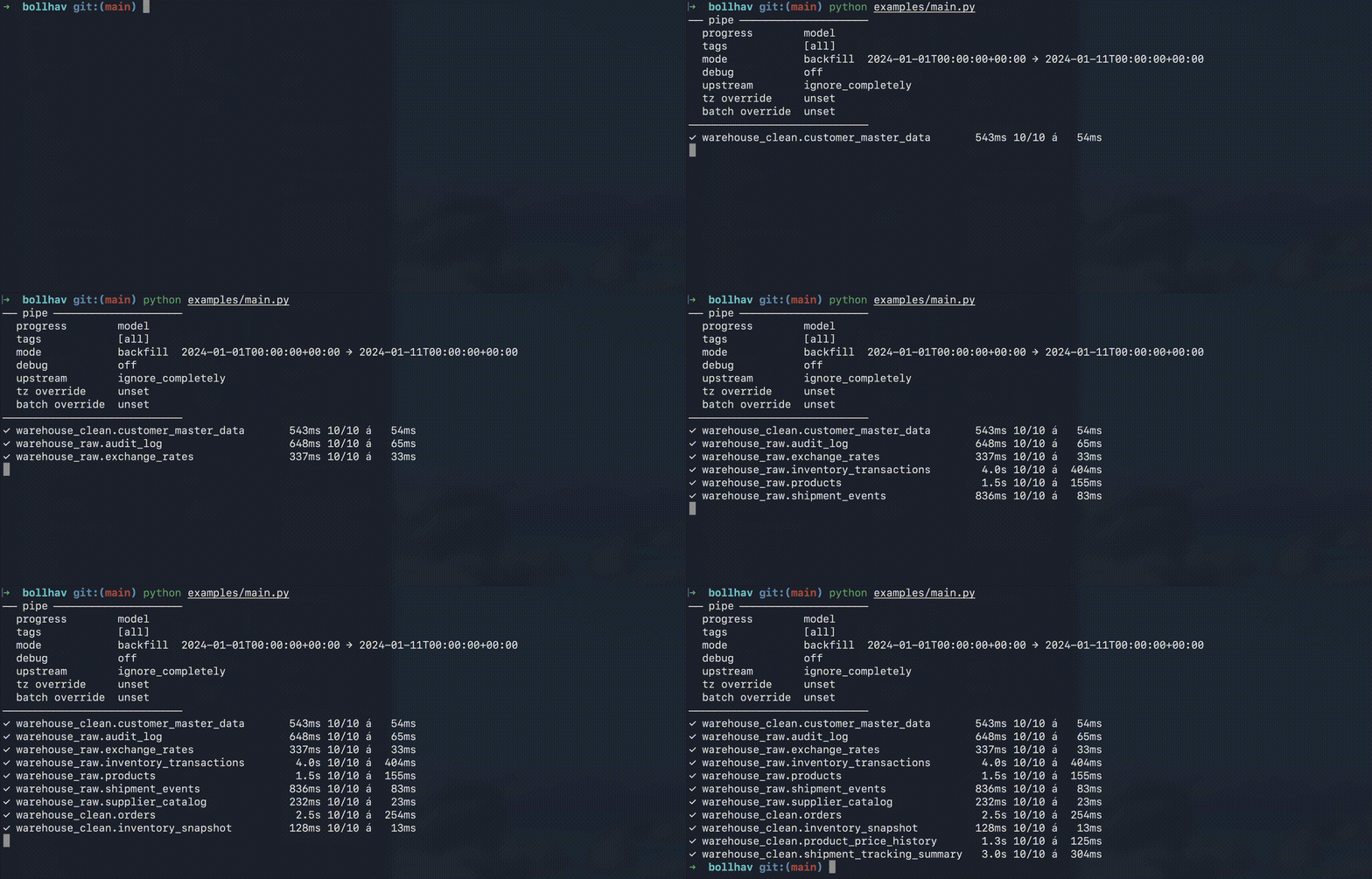
model (default)
Prints one line per completed model.
Each line shows: model name, total elapsed time, batches completed, and average batch duration. No spinning animation.
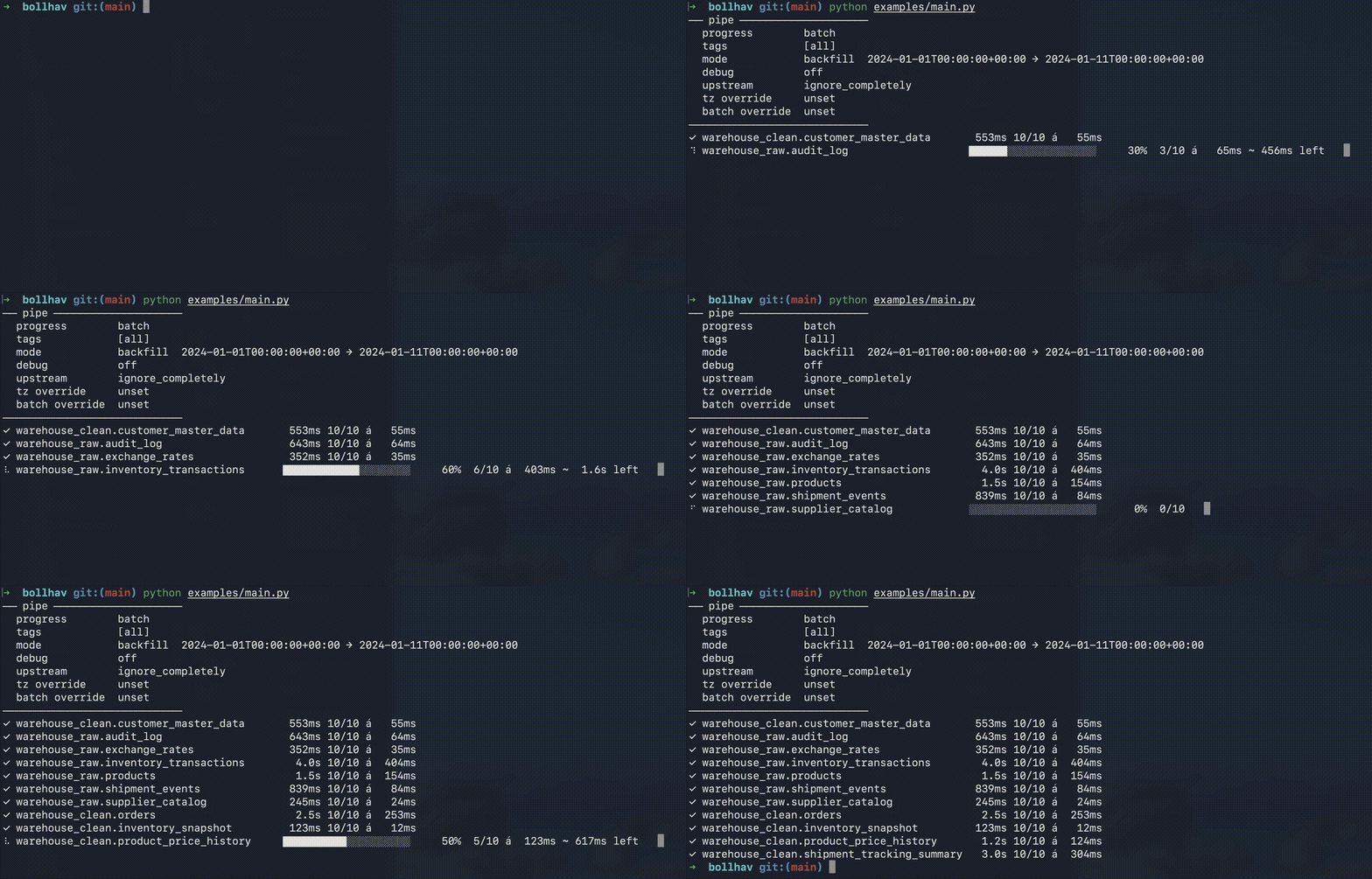
batch
Shows a live spinner with per-batch progress, then a finish line per model.
The spinner animates at 0.3s intervals. In a terminal it overwrites the same line. In logged output (e.g. CI/CD) each spinner frame becomes its own line — use model or minimal in production to avoid noisy logs.